![Gemini-Logic-Logo (1).png]](https://cs.geminilogic.com/hs-fs/hubfs/Gemini-Logic-Logo%20(1).png?height=40&name=Gemini-Logic-Logo%20(1).png)

Outgoing Server Information - from your office email account setup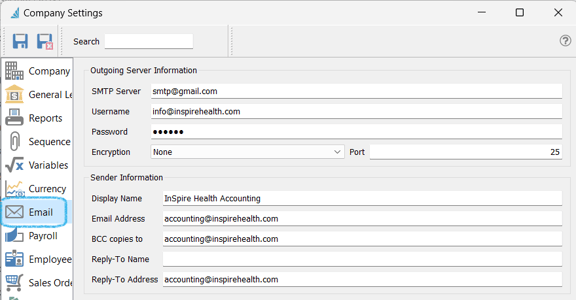
- SMTP Server
- Username (email address)
- Password for this email account
- Encryption
- non-Google - accept None
-
- Google - TLS
- Port
- non-Google - enter 25
- Google - enter 587
Sender Information
- Display Name you wish to use on outgoing emails from Spire
- Email Address you wish your recipients to see on emails from Spire
- BCC copies to another email address if you wish
- Reply-To Address if different than the Email Address entered above
See also User Settings - Email